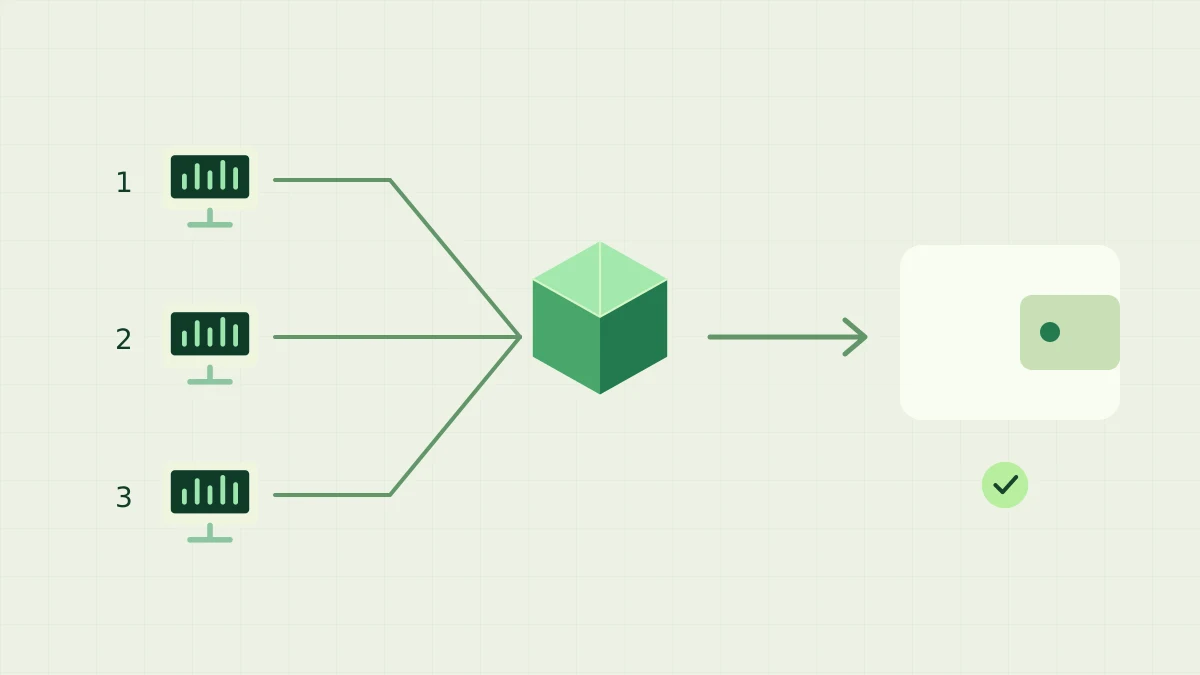
You can add a second computer to bntpool.com while keeping one receiving wallet. Give each mining setup its own name, verify it separately, then monitor the combined address. This guide walks through adding that second machine and untangling duplicate names. If you are starting with your first miner, complete the pool setup guide before expanding.
Can several computers mine to the same wallet?
Yes. Run seine on each computer with the same receiving address and a distinct pool rig name. bntpool.com records work and rewards for the address, while rig names separate the activity shown in your statistics. Verify accepted shares from each machine before relying on the combined address view.
Separate computers send work through the pool to one receiving address; each computer keeps a distinct rig name.
Choose the receiving address and a naming scheme
Use the receiving address from your wallet, or a Blocknet ID that resolves to that address. Check the resolved address on each miner before letting it run. A name is convenient input, but pool accounting follows the resulting address. If you later change where an ID points, an existing mining run can retain its earlier resolution until restarted; previously earned rewards stay with their original address.
The mining wallet guide covers obtaining a receiving address. Mining machines only need that public destination: keep the recovery phrase and private keys with the wallet. Choose short, recognizable rig names such as desktop-01 and server-02. The pool trims surrounding whitespace and keeps up to 64 characters, so put the distinguishing part near the beginning rather than at the end of a long label.
Add the second miner with its own name
Install the appropriate seine release on the second computer and run it from its extracted folder. In Windows PowerShell, the first example below sets the receiving name, pool and rig explicitly. Replace @yourname with your own ID or full receiving address before running it. Keep the quotation marks around that argument. Use your existing tested backend or tuning flags when that machine needs them.
.\seine.exe --address "@yourname" --pool-url stratum+tcp://bntpool.com:3333 --pool-worker desktop-01
On Linux or macOS, the corresponding command starts with the executable shown below and uses a different rig name. The operating systems can differ; the receiving address should match. Each example starts actual mining. Run one on the appropriate computer, then let its normal startup and tuning finish. You do not need to run both examples on the same machine.
./seine --address "@yourname" --pool-url stratum+tcp://bntpool.com:3333 --pool-worker server-02
Which settings are shared between computers?
Share the receiving address and pool endpoint. Keep a separate local data folder and rig name for each installation. seine saves connection settings in seine.config.json under its data directory; the default ./seine-data depends on the launch folder. Restarting from another folder can therefore find another configuration. Using a stable launch folder makes the saved setup easier to maintain.
If you copy a configuration file from the first machine, set a distinct rig name in the second machine’s launch command and confirm it in the startup information. Keep that explicit name in future launch commands too: an override does not rewrite an existing saved name. Keep hardware choices appropriate to that computer and let it tune locally. The address argument sets the payout destination; the rig argument sets a display name. Enter them separately as shown above.
How do you check that both computers are contributing?
Open My Stats on bntpool.com and look up the common receiving address. Check for the two names and a recent share from each. On each machine, confirm accepted submissions in the miner as well. Work through one computer at a time: this links a local process to a pool row and makes mistakes easier to find than watching only a combined hashrate total.
The pool estimates hashrate from submitted shares, so a new rig can need time and accepted work before its reading becomes informative. Local rates and pool estimates cover different measurements and time windows. Use recent shares and accepted counts to establish activity first, then compare longer observations. The stats guide explains the cards and rows without requiring you to infer device counts from a connection total.
What if rigs are missing or share a name?
If both computers use the same name under the same address, their recorded shares are grouped together. Rename one with its own pool rig flag and restart that miner. New submissions use the new label; past records retain the old one. The old row can remain visible while its historical shares are in the page's reporting window. Renaming a rig does not move the address's earned balance.
For a missing machine, compare its actual resolved address, pool endpoint and rig name with the page you opened. Then check whether its miner is connected and submitting accepted shares. A CPU and GPU running within one seine process do not require separate rig names for this setup. If submissions are rejected or stale, follow the share-status guide rather than repeatedly changing the wallet address.
How do combined rewards and payouts work?
Valid work from the computers contributes to the same address's participation in the pool's PPLNS window. Rig names help you track the contribution; they do not create separate payout balances. Adding a machine adds whatever useful work it actually submits, not a fixed reward per device or per name. Machines with different hardware and uptime can contribute different amounts, and more names alone do not increase earned work.
The PPLNS guide explains allocation when the pool finds a block. Confirmation and payout rules still apply to the combined address balance. You do not need to combine wallets or transfer balances between rig names after adding a computer. Before leaving the setup running, check the destination, a distinct name and accepted shares on every machine. Keep that small checklist when you add the next one.
Frequently asked questions
Do I need a separate wallet for each computer?
No. Each computer can use the same receiving address on bntpool.com, while a different rig name identifies each mining setup. The pool accounts for rewards by address. You only need the receiving address or your Blocknet ID on the mining machines, not the wallet recovery phrase.
What happens if two miners use the same rig name?
Under the same address, their share history is grouped under the same rig name. That makes it harder to identify the machine behind a reading. Assign a distinct name to each setup and restart it with that name; already recorded shares keep their original label.
Does adding another rig split my payout?
Rig names organize the display of mining activity. They do not create separate reward balances under the same address. Valid work from your computers contributes to that address's PPLNS participation, and its balance follows the pool's normal confirmation and payout rules.