Accept a Blocknet payment by giving the customer a clear BNT amount, checking the receipt in your own wallet, and keeping it with the order. This walkthrough uses a fictional order for 1.25 BNT with reference order-1042. It follows the released desktop wallet v0.22.0; screenshots use labeled demo data.
How do you accept a Blocknet payment?
Agree the BNT amount and order reference, send a request to an address you control, and wait for the incoming payment in your synchronized wallet. Match the amount and reference, check confirmations, then record the transaction ID and mark the order paid according to the confirmation policy you agreed with the customer.
Start with the desktop wallet guide if you need to create or open a wallet. Keep its recovery backup separately from order records. Receiving a customer payment does not require running a miner or joining a pool.
Set the amount and identify the order
Write down the order reference, BNT amount, receiving address and what the customer is buying. If you quote another currency, agree the BNT amount and how long that quote applies before they pay. A payment link carries the requested BNT amount; it does not maintain an exchange-rate quote or enforce a deadline.
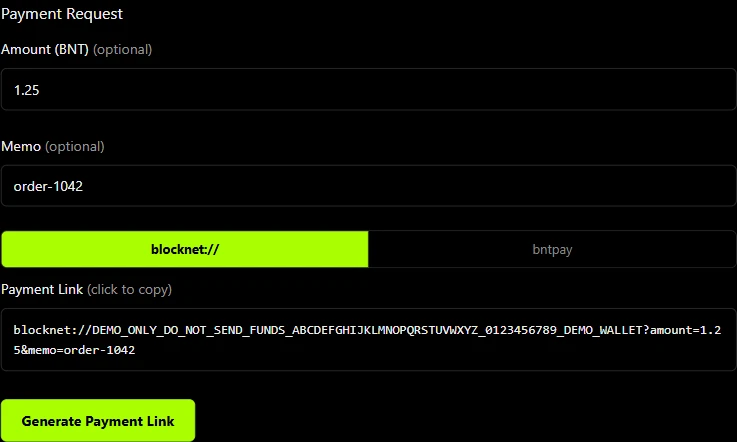
For the example, request 1.25 BNT and use order-1042 as the memo. An order number is enough: keep delivery addresses and other customer details in your private order system. An encrypted memo travels with the payment, but a memo written into a shared link is readable by anyone who receives that link.
In Receive → Payment Request, enter the amount and memo, then choose Generate Payment Link. Check the recipient and amount before sharing it. The payment-link guide explains the link formats and name-based recipients. For a fixed invoice, save the full receiving address alongside the request.
Check the receipt in your own wallet
Ask the customer to include the reference and retain their transaction ID. Once your node and wallet have caught up, open History and find the incoming receipt. Compare the amount and memo with the order. The payer can change either field, so the request itself does not establish what was sent.
Save the full transaction ID with the received amount. Do not count one transaction twice because it appears in both Dashboard and History, or because the customer sends the same ID again. Match actual receipts rather than a change in the overall wallet balance: that balance may include mining payouts, other customers and your own transfers.
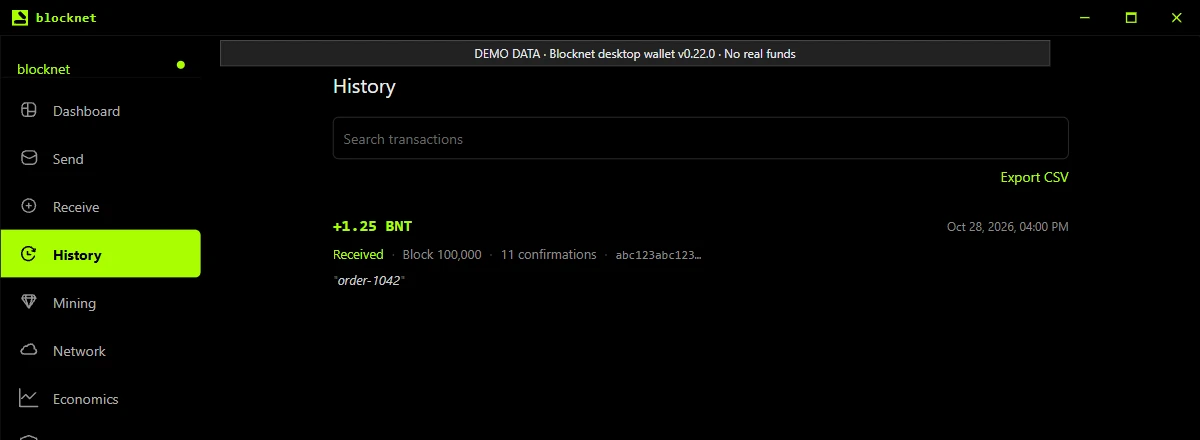
If the receipt is missing, compare the full destination address and transaction ID with the customer, then check synchronization. A screenshot of their send screen is useful context, but your receiving wallet establishes the amount it received.
When should you mark the order paid?
Distinguish an incoming unconfirmed payment, a transaction included in a block, and funds the wallet can spend. The released wallet waits for ten later blocks after an ordinary payment’s containing block before treating its outputs as spendable. The transfer-time guide explains the counters and variable waiting time.
State your confirmation policy before the customer pays. A straightforward manual workflow waits until the matching receipt is spendable before fulfilling the order. A visible incoming amount alone does not complete that check. Avoid promising a fixed delivery time based on a wallet countdown; block arrival varies. How mining secures payments explains why confirmation depth matters.
Handle partial, extra or unmatched payments
| What you verified | Next action |
|---|---|
| 1.00 BNT for the 1.25 BNT order | Record a partial payment and request the remaining 0.25 BNT. |
| A later 0.25 BNT receipt | Save both transaction IDs, total 1.25 BNT once, and check both receipts against your confirmation policy. |
| More than 1.25 BNT | Confirm whether the customer wants a refund or agreed credit; record the decision. |
| Correct amount, missing memo | Match the full transaction ID and destination with the customer before assigning it to the order. |
| Pending payment | Keep the order awaiting confirmation and check its current state again. |
For a refund, ask the customer to confirm a receiving address through the existing order conversation. Do not infer a return address from the public transaction: Blocknet’s public inputs do not provide a conventional sender address. Review the refund amount, destination and fee before approving the new send, and save its transaction ID with the original payment.
Share only the evidence needed for the payment
A public explorer helps check transaction inclusion, but it does not reveal the private amount received by your address. If receipt is disputed, the sender can provide transaction-specific evidence using the payment-proof guide. Verify recipient matches and amount as well as chain status; key validity alone is insufficient.
Keep the order, request, incoming transaction IDs, verified amounts, confirmation decision and any refund together in private records. Share only the relevant receipt or proof with the customer. Never send recovery words, wallet passwords or wallet-wide private viewing keys as payment evidence.
If you also mine BNT, keep pool payout records separate from customer orders, even when both use the same wallet. This makes it clear which transfer paid which invoice.
Frequently asked questions
How do I know a customer has paid in Blocknet?
Find the incoming payment in your own synchronized wallet, match its amount and order reference, and check its confirmation state. Record the full transaction ID against the order. A customer screenshot or a generated payment link alone does not establish receipt, and an explorer cannot show the private amount paid to your address.
What if a customer sends less BNT than requested?
Keep the order partially paid and calculate the remaining amount from payments you have actually verified. Ask for the difference using the same order reference, then record both transaction IDs. Count each receipt only once. If you agree to cancel instead, confirm a refund address with the customer through your existing order conversation.
Does a payment memo automatically mark an order as paid?
No. A memo helps you associate a receipt with an order, but the payer can edit or omit it. Check the received amount and transaction state yourself. The wallet creates requests and displays receipts; the manual workflow in this guide does not add an automatic checkout or order-management system.